Yesterday, one of my clients asked me to add list pages in teh global navigation and I am sure everyone who uses MOSS will be familier with a well known isuse of its navigation that it does not highlight list pages and pages which are in libraries other than Pages library and at root.
So now I have left with one option which was to create my own one but wait a minute, SharePoint Menu control which is inherited from ASP.Net menu control is a sealed one so no luck. Then I decided to do a little bit google and found this cool article with source code as well.
Try this one and enjoy :)
http://blogs.microsoft.co.il/blogs/itaysk/archive/2007/09/18/sharepoint-navigation-make-current-item-highlighting-work.aspx
Wednesday, January 21, 2009


How to delete My Site of a user within SharePoint
To delete my site of a particular user, run following command
stsadm -o deletesite -url http://spswebname/personal/username.
You can fine stsadm command at $:\Program Files\Common Files\Microsoft Shared\web server extensions\12\bin and don’t forget to replace spswebname with actual web name, and username with the name (loginname) of that user. For this, login as SharePoint administrator.
Problems with Infopath forms over Internet & ISA Servers
Yesterday, one of my client sent me a request that they published our workflow solution built over InfoPath 2007 Form services and WWF over internet and suddenly discovered that users could not access or submit the form using FQDN.
Their users were accessing SharePoint sites and InfoPath form in one of following different ways:
Via the Intranet: http://intranet
Via the Extranet: http://extranet.ourcompany.com
Via the ISA Server: https://interet.ourcompany.com
The form is set to full trust, published from InfoPath as a site content type and deployed as Administrator-approval required form (browser compatible) and then activated through Central Administration. It was activated at http://intranet.
At that time, I enabled SharePoint logging and started drilling into log files where I came to know that for some odd reason InfoPath form was submitting the data to the internal URL which was http://intranet. Strange!!!
The following error message was generated on submitting the form (also for ISA server users):
The form cannot be submitted to the Web server either because your computer is offline or because the host server is currently unavailable. If this problem persists, contact your network administrator.
On closing the form users were then redirected to http://intranet (the URL that the form is published to in InfoPath) which of course they could not access.
The following post seemed exactly the same as our scenario:
http://social.msdn.microsoft.com/forums/en-US/sharepointworkflow/thread/111e0764-8342-4fb0-8d19-68d5a75ed45a/.
So, we added a Link Translation rule in the ISA Server to replace the FQDN InternalDomain with ExternalDomain (Without http://)
Eg:
https://internet.ourcompany.com
internet.ourcompany.com
The form is now working correctly for all users.
Thursday, September 18, 2008
You cannot upload files that are larger than 28 MB on a Windows Server 2008-based computer that is running Windows SharePoint Services 3.0
In the morning, I was asked to upload a file of 110 MB in our picture/vedio library. When I tried to do it after chainging the maximum file size in Central Administration, I started getting following symptoms:
- Single File Upload via Document Library -- Nothing happens, you get a 404 page.
- Multiple File Upload via Document Library -- It seems to upload the file but then after the page refreshes, the file is nowhere to be found.
- Single or Multiple File Upload/Copy/Paste using open with Windows Explorer -- The file begins uploading but then towards the end you get the following error:
Could not find this item
This is no longer located in C:\filepath. Verify the item’s location and try again.
To resolve the above error, go to web.config of your web application and add following tags at the end of web.config:
<system.webserver>
<security>
<requestfiltering>
<requestlimits maxallowedcontentlength="file size in bytes">
</requestfiltering>
</security>
</SYSTEM.WEBSERVER>
Wednesday, September 17, 2008
Errors after installing Infrastructure update for MOSS 2007
During last month, I applied Infrastructure udate of SharePoint 2007 in my development envrionment and everything was working like a charm. So I decided to apply the same fix in my production environment this week.
Here I will like to mention one thing. I started this project as migration one where we were supposed to migrate MOSS 2007 + Windows 2003 environment to MOSS 2007 SP1 + Windows 2008 environment. So it was basically a restored farm.
After applying the Infrastructure upgrade, I started facing the issues:
"The resource object with key 'S2SearchAdminDashboard_Title' was not found" for Search Administration site
and
"The resource object with key 'S2LeftNav_Administration' was not found" for other search links.
After searching a while on Google, I was able to find the solution. Solution is quite simple. Sort all files within App_GlobalResources folder based on the date in the development environment where everything was working fine. Copy files which were modified on 3/25/2008. These will be the most new ones. Copy them over to the SSP virtual directory of your troubling farm within the same App_GlobalResources folder. These files are:
searchadmin.en-us.resx
SearchAdmin.resx
sps.en-US.resx
and sps.resx
Then if you will try, you will get the following error:
Could not find the sitemap node with URL '/SearchAdministration.aspx'.
Now this time, copy layouts.sitemap file which will be the most latest modified file within _app_bin folder from the development environment to production environment. As soon as that was copied over, the search administration page appeared fine.
Tuesday, August 05, 2008
Talking about Develop on SharePoint webcast series
Quote
Develop on SharePoint webcast seriesIn this 10-part series, you will receive practical technical information from Robert Bogue and Andrew Connell, Microsoft SharePoint Most Valuable Professionals (MVPs), covering 10 fundamental developer topics on SharePoint Products and Technologies via Live Meeting Webcast.
20-May-08 ... Introduction to SharePoint for .NET Developers: Web Parts. Register
21-May-08 ... Introduction to SharePoint for .NET Developers: Data Lists. Register
27-May-08 ... Introduction to SharePoint for .NET Developers: Silverlight and SharePoint. Register
28-May-08 ... Introduction to SharePoint for .NET Developers: Using Event Handlers. Register
03-Jun-08 ... Introduction to SharePoint for .NET Developers: Page Branding. Register
04-Jun-08 ... Introduction to SharePoint for .NET Developers: Workflows. Register
10-Jun-08 ... Introduction to SharePoint for .NET Developers: Web Services. Register
11-Jun-08 ... Introduction to SharePoint for .NET Developers: Page Navigation. Register
17-Jun-08 ... Introduction to SharePoint for .NET Developers: User Management. Register
18-Jun-08 ... Introduction to SharePoint for .NET Developers: Custom Content Types. Register
Creating MOSS 2007 Theme
- On the SharePoint server go to the Themes folder e.g. c:\Program Files\Common Files\Microsoft Shared\web server extensions\12\TEMPLATE\Themes
- Make a copy one of the existing theme folders and its contents rename it e.g. MyTheme.
- Rename the .INF file within the MyTheme folder to MyTheme.INF
- Edit MyTheme.INF.
- At the info section, Change the title, to MyTheme. Change codepage, e.g 22200, replacing the code page will fixing error “A theme with the name “MyTheme 1011″ and version already exists on the server.”
- In the titles section, rename the names to your new name. this section is to present the name in the different language.
- At the info section, Change the title, to MyTheme. Change codepage, e.g 22200, replacing the code page will fixing error “A theme with the name “MyTheme 1011″ and version already exists on the server.”
- Provide an image to give a preview of your theme. This image should be placed in C:\Program Files\Common Files\Microsoft Shared\web server extensions\12\TEMPLATE\IMAGES. E.g. tmbMyTheme.gif
- Modify the c:\Program Files\Common Files\Microsoft Shared\web server extensions\12\TEMPLATE\Layouts\1033\SPTHEMES.xml to include a reference to the new MyTheme theme
<Templates>
<TemplateID>MyTheme</TemplateID>
<DisplayName> MyTheme </DisplayName>
<Description> MyTheme has a white background with blue control areas and orange highlights.</Description>
<Thumbnail>images/tmbMyTheme.gif</Thumbnail>
<Preview>images/ tmbMyTheme.gif</Preview>
</Templates> - Modify the CSS within MyTheme folder to personalize your theme.
- Run iisreset from the command prompt
- Apply the new theme to a “test site”,.
Impersonation in SharePoint 2007 OM
Whenever you are developing anything for SharePoint 2007 and that piece of code needs to perform some admin tasks which are not possible with the current user context, you are left with no other option but to impersonate.
Impersonation within SharePoint 2003 was not so easy. Although you can find the helper class easily on Internet but still you need to add that class to your solution and perform few calls which sometimes becomes quite irritating. It was a common issue with SharePoint 2003.
Thankfully, that issue has been addressed in SharePoint 2007 and now we have impersonation as part of SharePoint OM. It is as easy as calling a delegate. If you are familier with anonymous methods, you can get the idea from the following piece of code that how easy it is to elevate user's rights within SharePoint 2007.
SPWeb web = SPContext.Current.Web;
SPUser user = web.CurrentUser;
// the calling user
// Uses the SHAREPOINT\system creds with the SPUser's identity reference of user SPSecurity.RunWithElevatedPrivileges(delegate() {
web.AllowUnsafeUpdates = true;
SPList theList = web.Lists[listName];
SPListItem record = theList.Items.Add();
record["User"] = user;
// calling user
record.Update();
web.AllowUnsafeUpdates = false;
});
Sunday, July 09, 2006
No more ISAPI Filter in SPS
All SharePoint developesl will be pleased to know that Microsoft has finally removed the ISAPI filter of SPS which sometimes becomes pain in the neck. Now all the requests will be processed by the ASP.Net ISAPI and the redirection will be controlled by HTTP Modules and Hanlders. So if you want to write your own hooks in the processing of SPS, you just have to write either handler or module. No more un-managed code.
Tuesday, July 04, 2006
Document Conversion in Office 2007
Currently I am working in Petroleum Development Oman for the implementation of Office 2007.
Here I have Office 2007, SQL and Domain Controller all installed on the same machine. While using document conversion services. I got error that failed to perform the action CE_Other. I tried all the options but failed to configure it. Finally, someone from Microsoft told me that Document Conversion services do not work on the DC. You need to use them from some other machines due to some reason. Well it is good thing that these services are not allowed to run on DC as they are working with the file system as well but it should be documented at some place.
Lets see what else will come.
Thursday, June 08, 2006
Navision Vs Axapta
Many of us who are working on Microsoft Technologies are interested in the differences between GP, Axapta and Navision. In this search I came to the following annoted by Gerrit Combrink and Rene on the Microsoft.Public.Axapta newsgroup which might be helpful:
The focus areas of both products are around Manufacturing, Distribution and Services. The main differences are with functionality and technology.
(In Axapta, all this functionality is standard. There is no standard Services functionality in Navision. Such functionality needs to be built by ISVs.)
Axapta is aimed more towards the top end Mid market to corporate customers with complex requirements, while Navision looks after the lower to middle mid market segment with less complex requirements.
(Lower meaning: about 10 concurrent users. Above 20 users: Axapta)
Technology within Axapta also allows it to be a much stronger, more stable, higher performing competitor in a 3-tier environment as this is built into the existing architecture. You can also run a lot more concurrent users on a Axapta system than on Navision.
(Axapta's AOS technology (Axapta Object Server) provides scalability. Axapta has been tested from 1 user up to 3500 concurrent users.)
http://www.microsoft.com/BusinessSolutions/default.mspx
These are certain guidlines given by Oliver in deciding which product to use:
1. If the customer is more a technology freak -> Axapta
2. If the user need a vertical solutions -> Navision
3. If you need web services -> Axapta
4. If you have less than 30 Users -> Navision
5. If you have more than 500 Users -> run Axapta
The conclusion is that the use of Axapta or Navision is not decided on a rational basis, but on the basis emotions and sympathy for one of these products by the prospect.
Monday, January 02, 2006
Distributed Queries
Introduction
Many times we face the scenario where we have to execute some query on more than one database. One such example may be you have separate databases for each regional office and corporate office. At the end of year, you want o compile accounts and the effect of each regional office should reflect in these accounts. So you have to query each regional database but how to do this.
Well it is not so difficult. SQL server provides us system stored procedures and SQL functions that allow us to perform such operations.
Using the code
It is really easy to perform operations on different databases using distributed queries. Distributed queries provide SQL Server users with access to:
- Distributed data stored in multiple instances of SQL Server.
- Heterogeneous data stored in various relational and non-relational data sources accessed using an OLE DB provider.
Distributed queries can allow users to access another data source (for example, files, non-relational data sources such as Active Directory™, other SQL Servers and so on) using the security context of the Microsoft Windows account under which the SQL Server service is running. SQL Server 2000 impersonates the login appropriately for Windows NT logins; however, that is not possible for SQL Server logins.
Tables and views in external data sources can be referenced directly in SELECT, INSERT, UPDATE, and DELETE Transact-SQL statements. Because distributed queries use OLE DB as the underlying interface, distributed queries can access traditional relational DBMS systems with SQL query processors, as well as data managed by data sources of varying capabilities and sophistication. As long as the software owning the data exposes it in a tabular rowset through an OLE DB provider, the data can be used in distributed queries.
The simple way of performing a select operation against different data sources is:
Exec sp_addlinkedserver @server='Test', @srvproduct='', @provider='SQLOLEDB', @datasrc='192.168.1.254', @catalog='LuckyERP_LAL_Live'
Exec sp_serveroption 'Test', 'data access', 'true'
Exec sp_addlinkedsrvlogin 'Test', 'true'
Select * From OPENQUERY(Test, 'SELECT * FROM dbo.SalesContractHeader')
Where
@server: Is the label for the data-source that will be used to refer to it.
@srvproduct: Is the product name of the OLEDB data-source to be linked as the linked server. In case of SQL Server, you can either set it as ‘SQL Server’, in that case you can’t specify other parameters or you can leave it empty and set other parameters like catalog name and the IP address or host name of the SQL Server.
@provider: Is the name of the OLEDB provider for the data-source.
@datasrc: Is the name of the datasource as interpreted by the OLEDB provider. It can be either IP address of the server or its host name.
@catalog: Is the name of the catalog. In case of SQL Server, it is the name of the database to be linked to.
Executing sp_serveroption is optional. It is used to configure linked server. You can refer msdn for details. In our case, I enable ‘data access’ to linked server. The default behavior also allows data access to linked server. So doing this is not necessary.
Sp_addlinkedsvrlogin creates or updates a mapping between logins on the local instance of Microsoft SQL Server and remote logins on the linked server. For details refer msdn. The first parameter of this stored procedure is the local name of the remote server as specified in sp_addlinkedserver. The second parameter is @useself. A value of true specifies that SQL server authenticated logins use their own credentials to connect to remote server. In case the credentials are different then use false and specify locallogin, remote login and remote password after @useself parameter as 3rd, 4th and 5th parameters.
Using this stored procedure is also optional as default behavior is to use SQL server authenticated logins’ credentials to connect to remote server.
Now after all things are properly configured, we come to actually executing a distributed query. Will it be different than executing ordinary select or DML queries? I don’t think so. There is only a slight difference. Use OPENQUERY to execute the specified pass through query on the given linked server and here we are done with executing a distributed query.
Points of Interest
Have you notice that it is not necessary that the linked server is always SQL Server. Yup you can use any OLEDB source as the data-source in distributed queries including SQL Server, Oracle, MS-Access, ODBC data-source, File system of Indexing Service, MS-Excel Sheets and IBM DB2 Databases. Wow what a long list and you can also develop your own data-source by implementing OLEDB interface. Thanks to Microsoft SQL we are able to perform operations on heterogeneous data stored in such diversified data-sources.
Wednesday, December 28, 2005
Paging in SQL
Many times, it is required to implement paging in SQL. Well you can find many ways to accomplish it but recently I came across to a very simple way of doind this.
Consider you want to find the records from 21-30 in order of their IDs, then you can do this using the folllowing query:
SELECT TOP pagesize *FROM (SELECT TOP (pagesize*pagenumber) * FROM tableName ORDER BY ID)
ORDER BY ID DESC.
Yup it is a very easy and handy way to implement paging.
Consider you want to find the records from 21-30 in order of their IDs, then you can do this using the folllowing query:
SELECT TOP pagesize *FROM (SELECT TOP (pagesize*pagenumber) * FROM tableName ORDER BY ID)
ORDER BY ID DESC.
Yup it is a very easy and handy way to implement paging.
Monday, December 19, 2005
Validating numeric data type
Many times we face the situation where we want to validate whether user input is numeric or not. In .Net it is reallly esy to validate the data type of user input using Regular Expressions. An example of how to validate that the data type of user input is numeric is:
bool Validate(string text)
{
Regex reg=new Regex(@"\D");
return !reg.Match(text).Success;
}
Here if text contains only digits then the resull of reg.Match is false, so Validate will return true and vice versa. Here decimal point is also considered as non digit and will cause the result of the function to be false.
Now the following code snippet will recognize the period "." as the part of the digits also but more than one periods will not cause error i.e 123.45.67 will also return true.
bool Validate(string text)
{
Regex reg=new Regex(@"[^0-9.]");
return !reg.Match(text).Success;
}
bool Validate(string text)
{
Regex reg=new Regex(@"\D");
return !reg.Match(text).Success;
}
Here if text contains only digits then the resull of reg.Match is false, so Validate will return true and vice versa. Here decimal point is also considered as non digit and will cause the result of the function to be false.
Now the following code snippet will recognize the period "." as the part of the digits also but more than one periods will not cause error i.e 123.45.67 will also return true.
bool Validate(string text)
{
Regex reg=new Regex(@"[^0-9.]");
return !reg.Match(text).Success;
}
Sunday, November 27, 2005
Windows Live
Well as the name suggests it is not an online version of Microsoft's venerable operating system. It is a kind of new type of web-based Microsoft Live Communication Server or you can say an enhancement of the services developed by MSN.
Windows Live consists of eight so Web-based services designed for customers. It consists of services like mail, online-messenger, online folder sharing, Internet telephony etc.
The most striking examples of Windows Live is ways of of tying it with desktop. People could share files-folders with the instant-messaging buddies and use the ww.Live.com page to view not only the Web-contents but also the things like recently opened documents or corporate SharePoint portal.
Live.com and Gadgets
Although customizing Live.com is not as easy as it should be due to skills and steps required to add cutom gadgets to it but the personalization features offered btu it are far more than that of Yahoo or even Google. Imagine you can use same point to view your corporate portal from home, access files from your office PC in another country or even check mails, send messages to your buddies and share file-folders with them. All from same point. Microsoft has promised to ensure that adding gadgets will be as easy as dragging and dropping a link on a site but at the moment it is not as easy. People have to go to microsoftgargets.com, copy a special URL, then go back to Live.com and follow a series of "advanced options". Gadgets has an important place in Windows Vista and Windows Live as Microsoft plans to use them thorughout them with no difference. The same gadget can also be used in Windows Vista. Microsoft also plans to use gadgets to retrieve locally stored information from PC to Live.com Web-page. Gadgets are actually small applications like Web-parts but they mainly consist of XML-based manifest file, JavaScript (containing entry point) and CSS file. Live.com uses Atlas framework to extend JavaScript functionality. Live.com is designed to take things one step further. It allows people not only to view Web contents and personalize them but also to save search queries as well as data from their PCs.
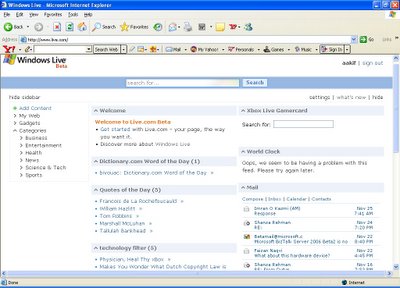
Windows Live Mail
Windows Live mail is an extension of hotmail codenames KAHUNA. It provides a new style of interface, a more desktop like mail software, with features including automatic inbox refreshing, spell-checking, phishsing detection and a preview pane that will enable hotmail users to read and respond to thier e-mails without ever leaving their inboxes. Its interface in known internally as "WAVE 11" and it is designed to be lightweight and clean for better performance. It provides preview to your e-mail without loading a new page each time (like Outlook®) drag and drop messages into folders, and generally power through your e-mail in a flash.
Windows Live Spaces
Windows Live Spaces is a transition of MSN spaces with some added functionality.
Windows Live Messenger
Some of the biggest new thing that Microsoft has introduced in Windows Live is Windows Live Messenger. The new messenger has additional features like social networking, Internet telephony, folder sharing etc. Folder sharing is really a fantastic idea. You just have to drop a file on top of a contact which will allow you to create a shared folder. This folder will exist on both members' desktop and stay up-to-date with any changes to the shared file.
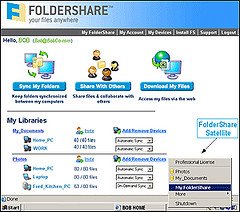
Windows OneCore Live
It is a security system that helps you protect your system. It includes features like virus scanning, firewall settings, software backups and tune ups.
Windows Live Search
It includes elements of Microsoft's Virtual Earth mapping. It allows members or their buddies to creat annotations, creating a personalized map of their favorite spots in the city, even from your mobile, plus you can see detailed maps, driving directions and more.
Windows Live consists of eight so Web-based services designed for customers. It consists of services like mail, online-messenger, online folder sharing, Internet telephony etc.
The most striking examples of Windows Live is ways of of tying it with desktop. People could share files-folders with the instant-messaging buddies and use the ww.Live.com page to view not only the Web-contents but also the things like recently opened documents or corporate SharePoint portal.
Live.com and Gadgets
Although customizing Live.com is not as easy as it should be due to skills and steps required to add cutom gadgets to it but the personalization features offered btu it are far more than that of Yahoo or even Google. Imagine you can use same point to view your corporate portal from home, access files from your office PC in another country or even check mails, send messages to your buddies and share file-folders with them. All from same point. Microsoft has promised to ensure that adding gadgets will be as easy as dragging and dropping a link on a site but at the moment it is not as easy. People have to go to microsoftgargets.com, copy a special URL, then go back to Live.com and follow a series of "advanced options". Gadgets has an important place in Windows Vista and Windows Live as Microsoft plans to use them thorughout them with no difference. The same gadget can also be used in Windows Vista. Microsoft also plans to use gadgets to retrieve locally stored information from PC to Live.com Web-page. Gadgets are actually small applications like Web-parts but they mainly consist of XML-based manifest file, JavaScript (containing entry point) and CSS file. Live.com uses Atlas framework to extend JavaScript functionality. Live.com is designed to take things one step further. It allows people not only to view Web contents and personalize them but also to save search queries as well as data from their PCs.

Windows Live Mail
Windows Live mail is an extension of hotmail codenames KAHUNA. It provides a new style of interface, a more desktop like mail software, with features including automatic inbox refreshing, spell-checking, phishsing detection and a preview pane that will enable hotmail users to read and respond to thier e-mails without ever leaving their inboxes. Its interface in known internally as "WAVE 11" and it is designed to be lightweight and clean for better performance. It provides preview to your e-mail without loading a new page each time (like Outlook®) drag and drop messages into folders, and generally power through your e-mail in a flash.
Windows Live Spaces
Windows Live Spaces is a transition of MSN spaces with some added functionality.
Windows Live Messenger
Some of the biggest new thing that Microsoft has introduced in Windows Live is Windows Live Messenger. The new messenger has additional features like social networking, Internet telephony, folder sharing etc. Folder sharing is really a fantastic idea. You just have to drop a file on top of a contact which will allow you to create a shared folder. This folder will exist on both members' desktop and stay up-to-date with any changes to the shared file.

Windows OneCore Live
It is a security system that helps you protect your system. It includes features like virus scanning, firewall settings, software backups and tune ups.
Windows Live Search
It includes elements of Microsoft's Virtual Earth mapping. It allows members or their buddies to creat annotations, creating a personalized map of their favorite spots in the city, even from your mobile, plus you can see detailed maps, driving directions and more.
Saturday, November 26, 2005
Technical Interview Questions - Part 2
Q.1 Is it possible to have a private constructor?
Yes, it is possible if you want to prevent its instantiation or if you want to have a singleton class.
Q.2 What is the purpose of singleton pattern?
To manage accesses to a shared resource.
Q.3 Is it possible that we can inherit singleton class?
A singleton class cannot be inherited i.e. a class having its ocnstructors private including the default constructor cannot be inherited. It will generate a compile time error.
Q.4 Can we implement inheritence (polymorphism) using delegates?
Yes we can implement polymorphism using delegates i.e. inheritance. A delegate can be attached to any function having same signature.
Q.5 Can we use delegates in place of inheritence (polymorphism)?
Nops, we cannot do this as delegates can be attached to any function having same signature but in case of inheritance only methods of the same class or its parent class can be called.
Q.6 Which is faster, stored procedures or embedded SQL?
Stored procedures as they are pre-compiled, optimized and stored with the database. On the other hand embeded SQL is compiled every-time when it is executed.
Lazy Instantiation and the Singleton Pattern
Lazy Instantiation:
Lazy Instantiation lets the creation of objects be put off until they are actually needed i.e. they are created on need. Then what is its relation with singleton pattern. This is actuall what it is required in singleton pattern. Here I want to point out one more thing that lazy instantiation is closely related with the static members. The .Net compiler deals with the static members in the same way. They are created when any member (static or instance) member of the class is first referenced in the Application Domain and remain alived until the AppDomain exists but I think the big plus of using static members is that they are thread-safe and optimized by the constructor of .Net.
Usually we implement singleton-pattern using the following code:
public sealed class Singleton
{
static Singleton instance=null;
Singleton()
{ }
public static Singleton Instance
{
get
{
if (instance==null)
{
instance = new Singleton();
}
return instance;
}
}
}
but the above code is not thread-safe as two threads can simultaneously check the status of instance variable and both can enter into critical section. Another way of doing this is to use locking like :
public sealed class Singleton
{
static Singleton instance=null;
Singleton()
{ }
public static Singleton Instance
{
get
{
lock (instance)
{
if (instance==null)
{
instance = new Singleton();
}
return instance;
}
}
}
}
but it will cause performace loss as at one time only one thread can be in critical section and having instance check outside the critical section will cause the same problem. A simple solution of the above problem is to declare and define the static instance of the object at the same time like:
public sealed class Singleton
{
static readonly Singleton instance=new Singleton();
// Explicit static constructor to tell C# compiler not to mark type as beforefieldinit
static Singleton()
{ }
Singleton()
{ }
public static Singleton Instance
{
get
{
return instance;
}
}
}
Now here a question arises. Why I have used static constructor when nothing is done in it? Well the secret of using it is the laziness of type initializers is only guaranteed by .NET when the type isn't marked with a special flag called beforefieldinit. Unfortunately, the C# compiler (as provided in the .NET 1.1 runtime, at least) marks all types which don't have a static constructor (i.e. a block which looks like a constructor but is marked static) as beforefieldinit. So to use static members in place of lazy instantiation, the class must have static constructor, otherwise ins laziness is not guaranteed.
Another thing, if the class has another static member, in that case also the laziness of the class is not guaranteed.
Tuesday, November 22, 2005
Technical Interview Questions
Q.1 What is a diff between an abstract class and an interface ? What would govern your decision for its usage in .NET?
Well I have seen many people get confused in this question and telling differences as:
1 -- An abstract class is a class which cannot be instantiated and an interface is a set of functions. Thier usage would be goverened by the follwoing reasons :-a. If I have some common functions to be implemeted in the base class then one should use abstract class as Interface cannot have funcation implementations.b. Languages like C# and VB.NET only allow single inheritance of classes hence you have only one base class and rest will have to be created as interfaces.e.g. If I did my class A to inherit from Class B and Class C .. then inheritance can only be done from one of these classes the one will have to created as an interface.
c. Interfaces cannot have state information i.e. they cannot contain variables but can contain constants. On the other hand, an abstract class can contain both variables and constants.
All these answers are right but one has missed the key answer. A child class implements interface but extends abstract class.
What it actually means is that an interface is a contract between 2 or more classes i.e. it defines mutual agreement between 2 or more parties like interfaces exposed for COM objects.
On the other hand an abstract class defines a relationship with its child class not the contractual relationship but inheritance. It is a IS-A relationship between abstract class and child class.
So if you want to implement generalization/specialization i.e. HAS-A relationship then use abstract class but if you want to provide a common interface or contract between 2 or more parties so that service-consumer class only needs to know the services of its service-provider class not their implementation use Interfaces.
Q.2 Can you have two applications on the same machine one which is using .NET Framework 1.0 and the other using 1.1 ?
Yes
Q.3 If you are using a web service and you want its path to be picked up from the config file what will you do ?
Set its behaviour property to dynamic this will add a new appSetting entry in the config file for the webservice path.
Q.4 Can I serialize Hash table with XmlSerializer?
XmlSerializer will refuse to serialize instances of any class that implements IDictionary, e.g. Hash table. Soap Formatter and Binary Formatter do not have this restriction.
Q.5 Whether ADO.Net provides conneted recordset like ADO or dis-connected?
ADO.Net provides both types of recordsets. A connected recordset is called data-reader but using data-reader we cannot modify database using it. It is useful for small number of data-records as it is very fast but useless for large number of records as it will keep the connection with tha data-base for a long number of time. We can extract records from multiple tables i.e. multiple record-sets in the same data-reader.
A dis-connected record-set is called a DataSet. It is a complete mirror of data-base i.e. we even can keep relationships in it. A data-set can contain multiple tables with relationships among them. User can write the contents of the dataset in an XML file without any effort. A data-set can also be used to move data from one database to another.
Q.6 What does 'managed' mean in the .NET context?
The term 'managed' is the cause of much confusion. It is used in various places within .NET, meaning slightly different things.
Managed code: The .NET framework provides several core run-time services to the programs that run within it - for example exception handling and security. For these services to work, the code must provide a minimum level of information to the runtime. Such code is called managed code. All C# and Visual Basic.NET code is managed by default. VS7 C++ code is not managed by default, but the compiler can produce managed code by specifying a command-line switch (/com+).
Managed data: This is data that is allocated and de-allocated by the .NET runtime's garbage collector. C# and VB.NET data is always managed. VS7 C++ data is unmanaged by default, even when using the /com+ switch, but it can be marked as managed using the __gc keyword.
Managed classes: This is usually referred to in the context of Managed Extensions (ME) for C++. When using ME C++, a class can be marked with the __gc keyword. As the name suggests, this means that the memory for instances of the class is managed by the garbage collector, but it also means more than that. The class becomes a fully paid-up member of the .NET community with the benefits and restrictions that brings. An example of a benefit is proper interop with classes written in other languages - for example, a managed C++ class can inherit from a VB class. An example of a restriction is that a managed class can only inherit from one base class.
Q.7 What is reflection?
All .NET compilers produce metadata about the types defined in the modules they produce. This metadata is packaged along with the module (modules in turn are packaged together in assemblies), and can be accessed by a mechanism called reflection. The System.Reflection namespace contains classes that can be used to interrogate the types for a module/assembly.
Using reflection to access .NET metadata is very similar to using ITypeLib/ITypeInfo to access type library data in COM, and it is used for similar purposes - e.g. determining data type, their sizes for marshaling data across context/process/machine boundaries.Reflection can also be used to dynamically invoke methods (see System.Type.InvokeMember), or even create types dynamically at run-time (see System.Reflection.Emit.TypeBuilder).
Reflection can also be used for late-binding,r producing generic methods or mosly for dynamically generating classes and modules. Remarkable, isnt it.
Q.8 What is the difference between Method Hiding and Shadowing?
Well there is no difference in these concepts.They are just 2 sides of the same coin, 2 names of the same term but in different technologies. Method hiding is the concept of C# whereas method shadowing is the concept of VB.Net. Method Hiding and Shadowing are the concepts by which you can provide a new implementation for the base class member without overriding the member. It is similar to method overriding but only in this case you are hiding and shadowing the definition of the parent class. For both these concepts same rules apply as in case of Method overrding i.e. the signature of the method must be same.
Now what is the difference between Method hiding and Shadowing with Method overloading. Hmm, it is simple. The difference lies when you call the derived class object with a base class variable.In class of overriding although you assign a derived class object to base class variable it will call the derived class function. In case of shadowing or hiding the base class function will be called.
To shadow a member of the parent in child class, use Shadow keyword in VB.Net and to hide a member of the parent class in child, use new keyword in C#.
The following is the code snippent, showing these concepts:
Method Shadowing:
Public Class BaseShadow
Public Overridable Function OverrideMe() As String
Return "Base Class Override Me"
End Function
Public Function ShadowMe() As String
Return "Base Class Shadow Me"
End Function
End Class
Public Class DerivedShadow Inherits BaseShadow
Public Overrides Function OverrideMe() As String
Return "Derived Class Override Me"
End Function
Public Shadows Function ShadowMe() As String
Return "Derived Class Shadow Me"
End Function
End Class
Method Hiding:
public class BaseHide
{
public BaseHide()
{ }
public virtual string OverrideMe()
{
return "Base Class Override Me";
}
public string HideMe()
{
return "Base Class Hide Me";
}
}
public class DerivedHide:BaseHide
{
public DerivedHide()
{ }
public override string OverrideMe()
{
return "Derived Class Override Me";
}
public new string HideMe()
{
return "Derived Class Hide Me";
}
}
Thursday, November 17, 2005
MSN decides to jump into Net-calling future
Well now after Google Microsoft has also decided to come into Net-calling business. One of its demonstrations was given by Microsoft on the .Net 2005 launch ceremony. In Windows Live messaging service it is as easy to make a call to a friend as sending a text messaeg. It seemed to be a shot across the bow of companies like Skype and Vonage, which provides voice over IP.
The move comes as all the major portal and IM companies are moving more heavily into Internet calling. This move comes after the launch of Googles IM Google Talk, which focus on voice chatting. But Microsoft further added that it will be paid service even in its beta state.
For details: http://news.com.com/MSN+buys+into+Net-calling+future/2100-1032_3-5844873.html?tag=nl
Some Useful Network Commands
The following are some useful DOS commands that helps you monitor your netwok:
1. net user -- List users on your machine
2. net user /domain -- Lists all the users on the domain. If no domain is specified after /domain switch then it will get all the users from the first directory of the forest.
3. net user /domain username -- Lists the entire active directory entry for the user username from the active directory.
4. net view -- Lists all the active machines on the domain.
5. net view \\machineName -- Lists all the shares on the machine specified. It is optional whether to use its dns name or IP address.
6. net use \\machineName\IPC$ "" /u:"" -- Connects to the Inter Process Communication Share IPC$ on the remote machine (machineName) with the built-in anonymous user. The connection can only be established if the NetBIOS protocol is enabled on the remote machine and port 139 is not blocked.
7. net stat -- List all the open ports on your machine and their status.
8. nbtstat -A ipAddress -- Dumps the NetBIOS table of the remote machine.
9. arp -A -- Lists all the entries of your MAC table and their types.
10. route -- With the help of this command you can modify the routing table i.e. add, modify or delete all the gateway entries. e.g. route ADD 157.0.0.0 MASK 255.0.0.0 157.55.80.1 METRIC 3 IF 2 destination^ ^mask ^gateway metric^ ^Interface. If IF is not given, it tries to find the best interface for a given gateway.
11. route print -- Lists the routing table.
Subscribe to:
Posts (Atom)

 Posts


